
Home Automation App Development
Businesses exploring a home automation app usually want a product that customers understand instantly while the operation behind it stays manageable. For this model, ai capability and a clear admin / committee panel shape most of the development scope.
CloneAppTech designs and builds original apps, dashboards and integrations around your brand, pricing and operating rules.
Business model
How a home automation app makes money
Most home automation app projects follow one of three models: design marketplace, smart home platform, society management saas. Fees per flat or society. The right choice depends on who owns inventory or supply, how you earn per transaction and how much operational control you want.
Design marketplace
Leads or commission from designers and contractors.
Smart home platform
Hardware-led or subscription monitoring.
Society management SaaS
Fees per flat or society.
Target audience & use cases
Who this solution is for
- Institutions and public bodies
- Industry specialists with domain expertise
- Innovators working with new technology
- Existing home & smart living businesses replacing manual or outdated systems
Core application features
What the product needs on day one
- Model-backed generation or analysis
- Prompt templates and guardrails
- Usage metering per plan
- Feedback to improve answers
- Device pairing and provisioning
- Live status and controls
- Alerts and automations
- Usage history
- Vehicle profiles and documents
- Service history and reminders
- Inspection checklists with photos
- Telematics or charger status
Apps & user roles
Features for every role involved
Only the roles that apply to this business model are included.
01
Resident / homeowner app
- Ideas, products and designer booking
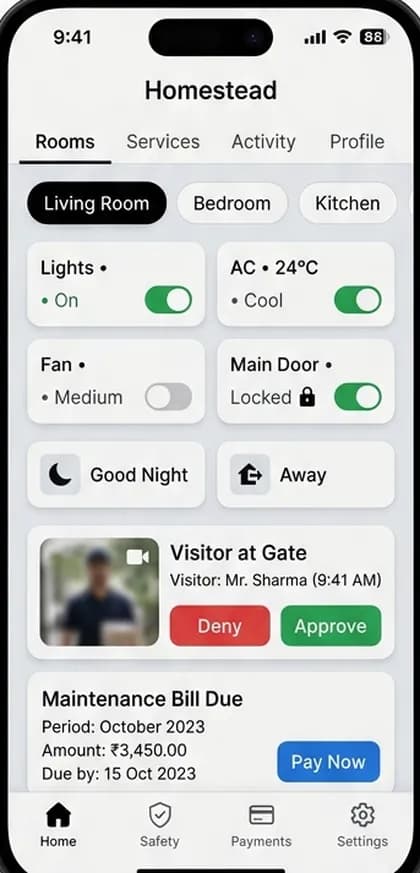
- Device control and automation
- Maintenance bills and visitors
02
Professional / vendor app
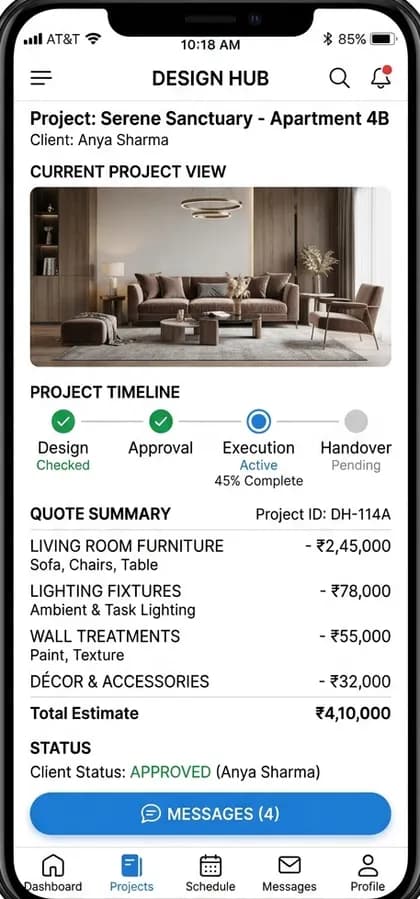
- Projects, quotes and timelines
03
Admin / committee panel
- Billing, notices and facility booking
- Security and visitor logs
Workflow
How a typical ai capability flow runs
- 1
Homeowner explores ideas or devices
- 2
Designer, product or device is selected
- 3
Project or installation is scheduled
- 4
Devices or services are managed in-app
- 5
Ongoing bills, alerts and maintenance tracked
Technology & integrations
Technical considerations
- Model choice affects quality, latency, price and data terms; retrieval over your own content improves accuracy.
- Hardware protocols and vendor SDKs define what is possible; secure provisioning is essential.
- Telematics, OCPP chargers and vehicle data APIs vary by vendor and region.
- IoT protocols (Wi-Fi, Zigbee, Matter) depend on hardware.
- Secure device provisioning.
- Real-time alerts for security events.
Customisation options
Make it yours
- Your brand identity, colours, typography and app icon
- Business rules for ai capability configurable from the admin panel
- Languages, currencies and regional tax settings
- Payment gateways and payout methods available in your country
- Commission, fee or subscription structure
- Optional modules added in later phases
Development scope
A typical first release includes the resident / homeowner app, professional / vendor app, admin / committee panel, a backend API, cloud hosting setup and the integrations for ai capability and device connectivity and vehicle data. Optional modules are planned into later phases.
Factors affecting pricing
What drives the cost of a home automation app
Medium-level projects typically start from ₹1.5 Lakh ($1,800). Your exact quote depends on these factors.
- Model usage and evaluation
- Hardware SDK integration
- Hardware and data integrations
- Inspiration vs. IoT vs. society tools
- Hardware integrations
- AR features
- Billing modules
Project phases
Estimated phases, testing and launch
Durations are agreed after discovery; testing, deployment and maintenance are part of every plan.
Phase 1
Discovery
Confirm the home automation app business model, user roles and must-have features.
Phase 2
Design
Original user flows and interface design for each app and the admin panel.
Phase 3
Build
Mobile apps, backend APIs and ai capability, device connectivity, vehicle data.
Phase 4
Test
Functional, device and load testing of critical flows.
Phase 5
Launch
Store submission, cloud deployment and monitoring.
Phase 6
Improve
Maintenance and roadmap features based on real usage.
FAQs
Home Automation App questions
How much does it cost to build a home automation app?+
Cost depends on the roles you need (resident / homeowner app, professional / vendor app, admin / committee panel), the depth of ai capability, integrations and platforms. Medium-level builds typically range from ₹4–10 Lakh ($4,800–$12,000) for multi-role apps, and from ₹1.5 Lakh ($1,800) for a focused first release; we confirm the exact quote after reviewing your requirements.
Will the AI make mistakes?+
Any model can. We add guardrails, citations where possible and human review for high-stakes outputs.
Will it work with my hardware?+
If the device exposes an API, SDK or standard protocol, usually yes. We confirm during discovery.
Can customers place furniture in AR?+
Yes, with 3D models of your products.
Related
Explore related solutions
Related app models
Related categories
Development services
Next steps
Free consultation
Planning a home automation app?
Tell us your market and must-have features. We'll suggest a realistic first release for your home automation app and the next steps.