
Smart City Services App Development
Businesses exploring a smart city services app usually want a product that customers understand instantly while the operation behind it stays manageable. For this model, device connectivity and a clear admin dashboard shape most of the development scope.
CloneAppTech designs and builds original apps, dashboards and integrations around your brand, pricing and operating rules.
Business model
How a smart city services app makes money
Most smart city services app projects follow one of three models: department-owned app, smart-city platform, civic-tech ngo tool. Community reporting and information. The right choice depends on who owns inventory or supply, how you earn per transaction and how much operational control you want.
Department-owned app
Funded by the agency for citizen services.
Smart-city platform
Multiple services under one city app.
Civic-tech NGO tool
Community reporting and information.
Target audience & use cases
Who this solution is for
- Institutions and public bodies
- Industry specialists with domain expertise
- Innovators working with new technology
- Existing government & civic services businesses replacing manual or outdated systems
Core application features
What the product needs on day one
- Device pairing and provisioning
- Live status and controls
- Alerts and automations
- Usage history
- Catalogue with variants and filters
- Cart, coupons and checkout
- Order tracking and returns
- Personalised recommendations
- Geo-tagged complaints
- Status tracking
- Document upload
- Payments
Apps & user roles
Features for every role involved
Only the roles that apply to this business model are included.
01
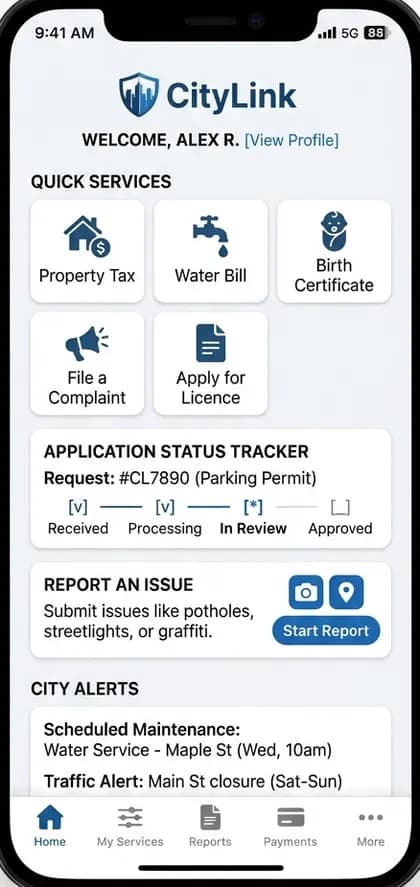
Citizen app
- Service catalogue and applications
- Track status
- Report issues with photo and location
- Alerts
02
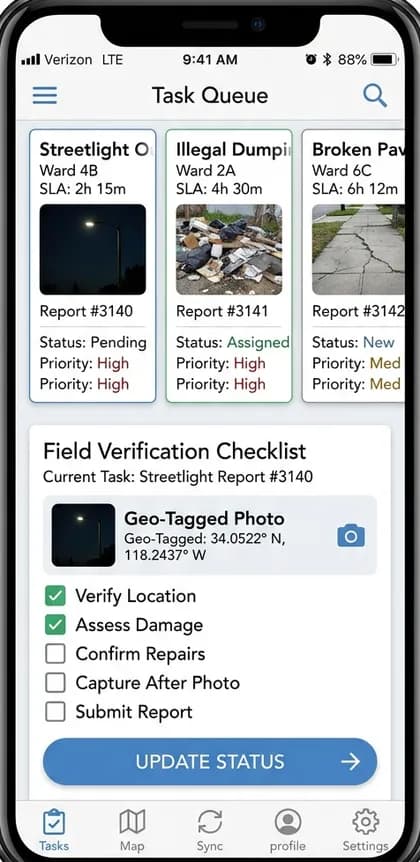
Officer app
- Task queues
- Field verification
- Status updates
03
Admin dashboard
- SLA monitoring
- Escalations
- Public dashboards
Workflow
How a typical device connectivity flow runs
- 1
Citizen submits a request or complaint
- 2
It is routed to the right department
- 3
Officer acts and updates status
- 4
Citizen is notified
- 5
Performance is reported publicly
Technology & integrations
Technical considerations
- Hardware protocols and vendor SDKs define what is possible; secure provisioning is essential.
- Search quality and image performance have the largest impact on conversion.
- Accessibility standards (WCAG) are essential.
- Integration with legacy government systems.
- Data residency requirements.
- Digital identity integration where available.
Compliance note: Public sector apps often require security audits, data residency and procurement compliance.
Customisation options
Make it yours
- Your brand identity, colours, typography and app icon
- Business rules for device connectivity configurable from the admin panel
- Languages, currencies and regional tax settings
- Payment gateways and payout methods available in your country
- Commission, fee or subscription structure
- Optional modules added in later phases
Development scope
A typical first release includes the citizen app, officer app, admin dashboard, a backend API, cloud hosting setup and the integrations for device connectivity and storefront. Optional modules are planned into later phases.
Factors affecting pricing
What drives the cost of a smart city services app
Medium-level projects typically start from ₹1.5 Lakh ($1,800). Your exact quote depends on these factors.
- Hardware SDK integration
- Catalogue, search and checkout
- Number of services
- Legacy integrations
- Languages
- Security audits
- Hosting requirements
Project phases
Estimated phases, testing and launch
Durations are agreed after discovery; testing, deployment and maintenance are part of every plan.
Phase 1
Discovery
Confirm the smart city services app business model, user roles and must-have features.
Phase 2
Design
Original user flows and interface design for each app and the admin panel.
Phase 3
Build
Mobile apps, backend APIs and device connectivity, storefront.
Phase 4
Test
Functional, device and load testing of critical flows.
Phase 5
Launch
Store submission, cloud deployment and monitoring.
Phase 6
Improve
Maintenance and roadmap features based on real usage.
FAQs
Smart City Services App questions
How much does it cost to build a smart city services app?+
Cost depends on the roles you need (citizen app, officer app, admin dashboard), the depth of device connectivity, integrations and platforms. Medium-level builds typically range from ₹4–10 Lakh ($4,800–$12,000) for multi-role apps, and from ₹1.5 Lakh ($1,800) for a focused first release; we confirm the exact quote after reviewing your requirements.
Will it work with my hardware?+
If the device exposes an API, SDK or standard protocol, usually yes. We confirm during discovery.
Can the app sync with my inventory?+
Yes, through your POS, ERP or e-commerce platform's API.
Is accessibility covered?+
We design against WCAG guidelines and test with assistive technologies.
Related
Explore related solutions
Related app models
Related categories
Development services
Next steps
Free consultation
Planning a smart city services app?
Tell us your market and must-have features. We'll suggest a realistic first release for your smart city services app and the next steps.